
Random Team Generator: Split Any List Into Fair Teams in Seconds
Nobody likes being picked last. And nobody organizing a class, a workshop, or a Friday sprint retro wants to spend twenty minutes manually dragging names into groups. A random team generator solves both problems: it splits any list of names into fair, unbiased teams in one click — no spreadsheets, no arguments, no favorites.
This guide covers what a random team generator does, how to use one properly, and how to avoid the most common mistake people make with them: forgetting about repeat pairings.
What Is a Random Team Generator?
A random team generator is a free online tool that takes a list of names and splits it into groups automatically. You paste your names, choose how you want to split them, and the tool does the rest.
Most basic versions just shuffle a list once. A better random team generator — like the one on ToolsOfSaaS — also handles multi-day planning, meaning it can build schedules for several days, rounds, or sessions while trying to stop the same two people from being grouped together over and over.
That second part matters more than people expect. If you're running a 5-day workshop and the tool just shuffles randomly each day, Sophia and Liam might end up on the same team four days out of five, purely by chance. A smart generator scores every possible arrangement and picks the one with the fewest repeat pairings, so people actually meet new teammates.
How to Use a Random Team Generator (Step by Step)
- Paste your names. One name per line. Don't worry about extra spaces or blank lines — the tool cleans those up automatically.
- Choose your split method. Either pick the number of teams you want (useful if you only have 5 tables in the room) or the number of members per team (useful if you want groups of exactly 4).
- Pick single or multi-day mode. For a one-off group, use single list mode. For a workshop, class, or tournament spanning multiple sessions, switch to the multi-day planner.
- Set your rounds and label style. Call them "Days," "Sessions," or "Rounds" — whatever matches your event.
- Click generate. The tool runs the shuffle, scores the results, and shows you the teams instantly.
- Check the repeat count. A good generator shows you exactly how many teammate pairs repeated, so you know how balanced your schedule really is.
- Copy or print. Paste the plaintext straight into Slack, Teams, or Google Docs, or print a clean handout with no ads or clutter.
Try it here: Random Team Generator & Multiday Planner (opens in a new tab)
Why "Split by Number of Teams" vs. "Split by Team Size" Matters
This trips people up constantly, so it's worth explaining plainly:
- Split by number of teams = you decide how many groups exist (e.g., "make 5 teams"), and the tool divides your names evenly across them.
- Split by team size = you decide how big each group is (e.g., "teams of 4"), and the tool creates as many groups as needed to fit everyone.
If you have a fixed number of tables, rooms, or breakout channels, split by team count. If you care more about group dynamics — say, you know groups of 3–5 work best for discussion — split by size instead.
Who Actually Needs This Tool
- Teachers splitting a class into project or lab groups without complaints about favoritism.
- Scrum masters rotating standup pairs so developers stop working in silos.
- Event organizers running speed-networking rounds or hackathon teams.
- HR teams mixing departments at a retreat so people actually meet coworkers outside their bubble.
- Coaches and club leads rotating doubles partners or game-night tables.
The common thread: anyone who has ever manually sorted a list into groups and thought, "there has to be a faster way."
The One Thing Most Free Team Generators Get Wrong
Most basic online shufflers do exactly one thing well: randomize a list once. That's fine for a single-day activity. But the moment you need groups across multiple days — a week-long training, a 3-round hackathon, a 6-round networking event — a plain shuffler will happily pair the same two people together every single time, purely by chance.
A random team generator built for multi-day planning checks hundreds of possible arrangements per round and picks the one that spreads people out the most. It won't always hit zero repeats — that depends on math, not effort (10 people in pairs can only run 9 rounds before someone repeats) — but it gets as close to zero as the numbers allow.
If your event runs more than one round, this is the feature to check for before you pick a tool.
Data Privacy: Why It Matters for Team Generators
If you're pasting a class roster or an employee list into a website, it's worth knowing where that data goes. Tools that process everything client-side (in your browser) never send your names to a server — which matters for schools under FERPA and companies under GDPR. Before pasting sensitive names into any random team generator, check whether the tool claims local, in-browser processing. If it does, your list disappears the moment you close the tab.
Random Team Generator Comparison: How the Tools Stack Up
Not every "random team generator" does the same job. Some only shuffle a list once. Others charge monthly fees for features you may never use. Here's how the main options compare:
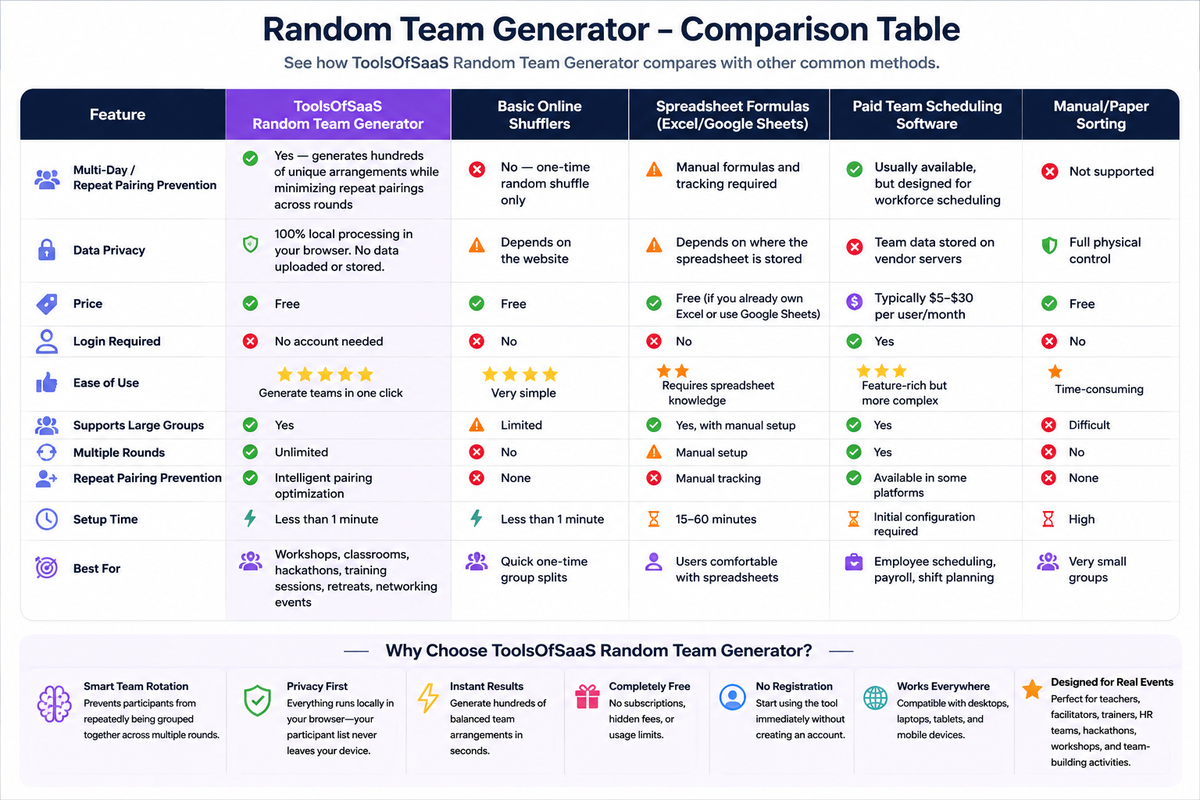
The short version: if you need groups for a single day, almost any free shuffler will do the job. If you're running something across multiple days, rounds, or sessions and want people to actually meet new teammates, you need a tool built for repeat-pairing prevention — which most free shufflers don't have, and most paid tools are overkill for.
Frequently Asked Questions
Is a random team generator really unbiased? Yes. A properly built generator uses randomization with no knowledge of names, skill, gender, or history — it can't play favorites the way a person picking teams manually might, intentionally or not.
Can I use a random team generator for more than one day? Yes, if the tool supports multi-day or multi-round planning. Look for one with a "repeat pairing reduction" or similar feature, otherwise you'll likely see the same pairs over and over across sessions.
What if my list of names doesn't divide evenly? A good generator balances the remainder automatically — for example, splitting 13 names into teams of 4 becomes two teams of 4 and one team of 5, instead of leaving one person alone.
Is it free to use a random team generator? Most browser-based random team generators, including the one covered here, are completely free with no sign-up required.
Can I print or export the teams? Yes — look for a built-in print or copy feature. The best tools strip out ads and navigation so you get a clean, printable roster.
Try the Free Random Team Generator
If you're ready to stop manually sorting names, the Random Team Generator & Multiday Planner (opens in a new tab) handles single-day shuffles and multi-day rotation schedules in one click — free, no login, and it never uploads your list to a server.